


Public charging can feel confusing the first time. I have seen many new EV drivers park, hesitate, and worry about payment. Tesla charging is simpler than it looks.
To use a Tesla charging station, I park at a compatible stall, open the charge port, plug in the connector, and let the session start. Tesla vehicles usually charge automatically. Non-Tesla EVs may need the Tesla app, a compatible plug, or Magic Dock access.
I like Tesla charging stations because the process removes many small steps. There is no card reader in most cases. There is no long menu. I only need to know which charger fits my vehicle, how payment works, and when I should move the car.
How to use a Tesla charging station for the first time?
The first visit can feel harder than the real process. I may worry about the cable, the port, or the screen. The safe way is to follow one clear order.
For a Tesla vehicle, I use navigation to find a Supercharger, back into the stall, open the charge port, plug in the cable, and check that the light turns green. For a non-Tesla EV, I use the Tesla app or a compatible access method before charging.
What should I check before I plug in?
| Step | What I do | Why it matters |
|---|---|---|
| Find a charger | I use the Tesla screen or Tesla app | It shows compatible stations |
| Park correctly | I align the car with the cable | Short cables need close parking |
| Open the port | I use the screen, app, or cable button | This avoids pulling on the cover |
| Plug in firmly | I push the connector fully into the port | Charging starts only after a good connection |
| Watch the light | I look for green flashing | Green means the car is charging |
I also tell first-time users not to charge to 100% unless they need it for a long trip. Tesla says Superchargers are built for quick stops, and charging above 80% is often not needed. A lower target also helps other drivers use the stall sooner.
Tesla Destination Charger vs. Supercharger
Superchargers are designed for speed. You can often get from 10% to 80% in 20–30 minutes depending on your model. They’re found along major highways, in shopping centers, and in urban hubs.
Destination Chargers are slower, but more relaxed. You’ll find them at hotels, restaurants, and some shopping centers. They’re often free to use if you’re a guest or customer. They’re perfect for topping up your battery while you eat, sleep, or hang out.
Knowing when to use each type makes your life easier. Use Superchargers for road trips and Destination Chargers when you’re staying somewhere overnight.
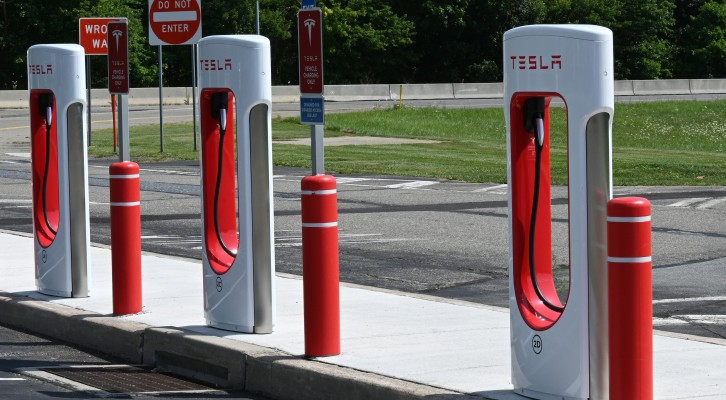
Do You Have to Pay to Use a Tesla Station?
This is a common question — and the answer depends on your car and your Tesla account. Most people do pay to use Superchargers now. The cost isn’t flat-rate, because Tesla uses a per-kilowatt-hour (kWh) pricing system, which usually lands between $0.22 to $0.36 per kWh in most regions.
To put it into perspective, fully charging a Tesla from empty to full might cost somewhere between $10 and $25 depending on your model and location. Some older Tesla owners may still have free unlimited Supercharging, but that’s pretty rare now. For everyone else, the cost is automatically charged to the payment method linked to your Tesla account.
And if you’re a non-Tesla driver, you’ll still pay — just through the Tesla app instead of the car itself.
Can Other Cars Use Tesla Superchargers?
Yes — and that’s one of the biggest changes Tesla has made in recent years. Certain Supercharger stations in the U.S. and Europe are now open to non-Tesla EVs using the NACS (North American Charging Standard) or CCS connectors. However, not all stations support this yet, so it’s essential to use the Tesla app to find the right ones.
If you’re driving a non-Tesla EV, download the Tesla app, tap on “Charge Your Non-Tesla,” and the app will guide you to compatible stations. You’ll also need the right adapter for your vehicle — either CCS or NACS depending on the model. Once you arrive, plug in, start the session through the app, and the process works just like it does for Teslas.
How Long Does it Take to Charge a Tesla?
Charging time depends on a lot of things — how low your battery is, what charger you’re using, and even the temperature outside. Superchargers are the fastest option and can usually give you around 200 miles in 15–30 minutes.
If you’re using a Destination Charger or a standard wall outlet at home, you’re looking at several hours or even overnight charging. The Tesla app gives you real-time updates, so you’ll always know what to expect.
Why the Tesla App Is a Must-Have?
The Tesla app isn’t just for unlocking your doors. It’s a full-blown control center for your car and charger. Through the app, you can check your charge status, control the climate inside your car while it’s plugged in, receive alerts when charging is complete, and even stop or start the session remotely.
It’s also the only way to use Tesla Superchargers if you’re a non-Tesla driver. Plus, if you’re on a long road trip, it shows nearby chargers and stall availability in real time, which helps avoid detours to full stations.
Where to Find Tesla Charging Stations?
Finding a Tesla charging station is actually really easy. If you’re driving a Tesla, just type your destination into the car’s screen. The system automatically shows Superchargers along your route and how many spots are open. It even preps your battery as you get close so charging is faster. Everything updates in real time, so you’re never guessing. If you’re not in the car, the Tesla app works just as well. You can see nearby chargers, how fast they are, and what’s around like restrooms or food.
If you’re driving a non-Tesla, don’t worry — you can still use many Tesla stations. Just open the Tesla app and choose “Charge Your Non-Tesla.” It’ll show you which chargers are compatible. Some stations may need an adapter, depending on your car. You can also use third-party apps like PlugShare or A Better Route Planner to find chargers near you. They work well for planning road trips or just finding a quick charge nearby.

How do you pay at Tesla charging stations?
Payment is one of the easiest parts, but it still causes doubt. I have met buyers who look for a payment terminal and think they missed something.
At most Tesla Superchargers, I pay through the Tesla account or Tesla app. The charging cost is charged automatically to the selected payment method after the session. Non-Tesla drivers usually use the Tesla app to start and pay for charging.
What payment setup should I prepare?
| Driver type | Payment method | Main action |
|---|---|---|
| Tesla driver | Tesla account payment method | Plug in and charge |
| Non-Tesla driver | Tesla app payment method | Select charger and start session |
| Fleet user | Company account or card setup | Track costs by vehicle |
| Guest user | App or available local option | Confirm site rules first |
I see payment as part of the whole EV charging design. A good charger does not only move power. It also removes confusion. For BESEN customers, this matters because many buyers serve hotels, parking sites, fleets, and retail locations. Their users need simple steps, clear status lights, and safe cables. Tesla has trained many EV drivers to expect a smooth charging flow. Other charging brands must match that expectation in daily use.
Do Teslas charge for free at Tesla charging stations?
Free charging is not the normal rule for every Tesla. This point creates many misunderstandings, because some older vehicles or special offers included free Supercharging.
Some Tesla vehicles have free Supercharging, but many do not. If a Tesla has free Supercharging, it can charge at Tesla-owned Supercharger sites at no cost, though related fees such as congestion fees may still apply.
How do I know whether free charging applies?
| Question | What I check |
|---|---|
| Did the car include free Supercharging? | I check the Tesla account or vehicle details |
| Is the charger Tesla-owned? | I check the station information |
| Are extra fees possible? | I check idle or congestion fee rules |
| Is the offer transferable? | I check the offer terms before buying |
I would not assume free charging before a purchase. I would ask for proof in the Tesla account. I would also read the current vehicle terms. This matters in used Tesla sales, because “free Supercharging” can sound simple, but the real rule may depend on the car, the owner, and the offer. As a manufacturer, I see the same lesson in EVSE projects. A charging product must have clear terms, clear labels, and clear user guidance. A small unclear detail can become a sales problem later.
Is Tesla actually cheaper than gas?
Many drivers ask this because fuel savings are one of the main reasons they consider an EV. 1 The true answer depends on local power prices, charging habits, gas prices, and vehicle efficiency.
Tesla charging is often cheaper than gas when I charge at home or use low-cost electricity. Supercharging can still be cheaper in many cases, but peak pricing, location pricing, and fees can reduce the savings.
What affects the real cost?
| Factor | Lower cost case | Higher cost case |
|---|---|---|
| Charging place | Home charging | Highway fast charging |
| Time | Off-peak rate | Peak rate |
| Driving style | Smooth city driving | Fast highway driving |
| Fees | Move car when done | Stay after charging |
| Vehicle | Efficient EV | Heavy EV with high use |
I usually explain it this way. Gas cost is simple at the pump, but EV cost is split by place and time. Home charging is often the best long-term value2. Public fast charging is best for travel and urgent top-ups. Tesla also shows prices before or during charging in its app or car interface, depending on the station and driver type. For business buyers, this means AC charging still has a strong role. Hotels, apartments, workplaces, and fleet depots can give users lower-cost daily charging instead of relying only on fast charging.
How do Tesla charging stations bill you?
Billing should not feel mysterious. Still, I always check the session summary, because fees can appear if I leave the car too long at a busy station.
Tesla Supercharger billing is automatic. Tesla bills the selected Supercharging payment method in the Tesla app. The bill can include charging cost and extra fees, such as congestion or idle-related fees where they apply.
What can appear on the bill?
| Bill item | What it means |
|---|---|
| Energy cost | The cost of electricity used |
| Time-based cost | A rate based on charging time in some places |
| Peak price | Higher rate during busy hours |
| Off-peak price | Lower rate during quiet hours |
| Congestion or idle fee | Extra fee when the car stays too long at a busy charger |
I always move the car when charging is done. This is good manners, and it avoids extra cost. Tesla says Supercharging costs and fees are billed to the payment method selected in the Tesla app. It also says some stations have on-peak and off-peak rates, so I check the price before I start.
Common Mistakes to Avoid at Tesla Charging Stations
One of the most common mistakes new users make is parking in a charging stall without actually charging — that’s a no-go. Tesla may charge you an idle fee if your car finishes charging and you’re still parked there. Another mistake is forgetting to check for charger availability ahead of time, especially during busy hours or holiday weekends.
Some drivers also leave their car plugged in longer than necessary, which can frustrate others who are waiting. And occasionally, people forget to press the button on the charger before trying to unplug — don’t force it. A gentle press on the release button does the trick.
Final Thoughts
Charging at a Tesla station is way easier than most people think. It’s fast, clean, and largely automated. Once you’ve done it once or twice, it’ll feel like second nature. If you’ve got any fun stories, tips, or advice for new Tesla or EV drivers, drop them in the comments — let’s make charging stress-free for everyone.
BESEN EV Charger Product Lineup:
BS20 EV Charger – Sold for 10 Years
BN30 Electric Car Charger – Cost-effective
BS30 EV Charging Station – 2023 Model
SQ20 EV Car Charger – Modern Design
PCD040 Portable EV Charger – High Power Charging
PCD050 Portable Car Charger – Designed for Luxury Car
BN20 Portable Electric Car Charger – 2024 Model
BN60 Portable EV Charger – High Power Charging
BN70 Portable Charger – 22kW High Power Charging with APP Control
SQP400 Portable EV Car Charger – High-spec Model
READ ON:
Tesla: Leading The Charge In The Electric Vehicle Era
How To Charge A Tesla At Home: An Ultimate Guide
How to Find EV Charging Stations?
Who Participates in the EV Charging Ecosystem?
- National consumer surveys and industry reports (for example, Pew Research Center and AAA EV ownership surveys) commonly list reducing fuel or fuel‑cost savings among the top reasons drivers report for considering or buying an electric vehicle; such findings illustrate common buyer priorities but vary by year, region, and survey population. [↩]
- U.S. Department of Energy resources (for example, the eGallon and AFDC cost comparisons) show that, under typical U.S. electricity and gasoline prices, the cost to drive a mile on electricity is often lower than the comparable cost on gasoline—supporting the claim that home charging can be cheaper per mile[↩]

